Overview
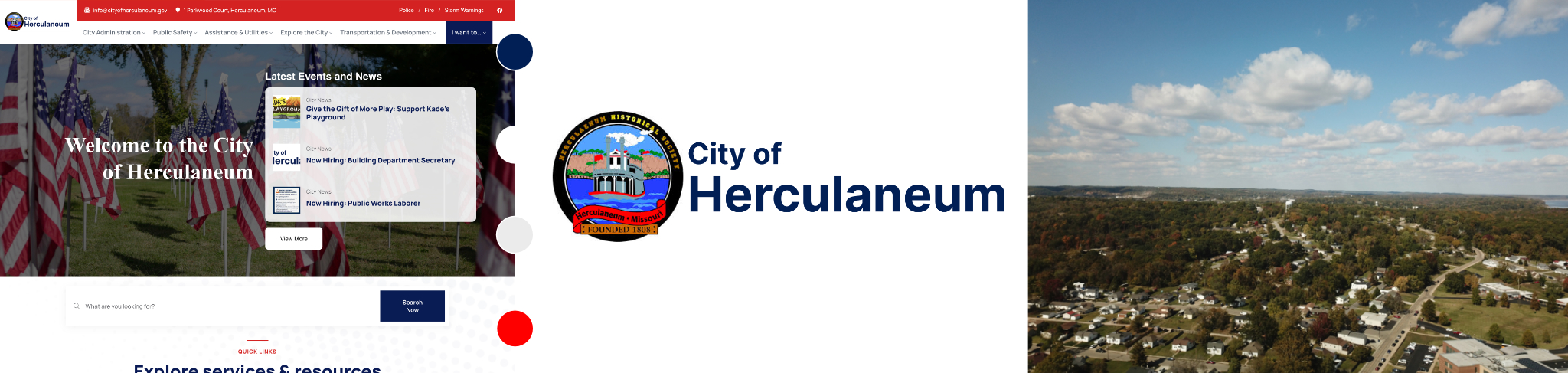
The City of Herculaneum’s digital presence was fragmented across multiple outdated domains, creating confusion for residents and duplication of work for city staff. The city needed to consolidate three separate websites—main city (.org), police, and fire departments—into a single, modern, mobile-responsive platform while transitioning to the official .gov domain. This government project required navigating city hall approval processes, managing stakeholder expectations across multiple departments, and delivering a comprehensive solution on a limited municipal budget.
Challenge
The city was managing three separate websites (.org main site, police, and fire departments) that were severely outdated with no mobile support. Critical functionality was broken—contact forms didn’t work, navigation was confusing, and residents couldn’t find essential services. The city needed to consolidate everything into a single .gov domain while staying within a tight municipal budget.
Solution
I led the complete redesign and consolidation into a unified WordPress website. Using Google Analytics and user research, I identified the most-accessed services and rebuilt the site’s information architecture around resident needs. The new mobile-responsive site streamlined navigation, fixed all broken functionality, and prioritized high-traffic services like bill payment, permits, and emergency updates. I managed the technical migration to .gov and implemented comprehensive redirects across all three legacy sites, ensuring zero downtime and preserved SEO value.
TOOLS
- Figma
- Google Analytics
- WordPress
- Domain migration
- DNS Management
- SEO
- Baymard Website
- NNG Website
- Photoshop
- Illustrator
Design research
The existing website represented years of neglect and patchwork updates. Through initial stakeholder meetings at city hall, I documented the key pain points from both the administrative and resident perspectives. City staff were frustrated with managing four separate websites, often copying and pasting the same announcements across multiple platforms. Residents frequently called the city office because they couldn’t find basic information online or because contact forms weren’t working. The tan and beige color scheme was dated, the layout was cluttered, and there was no clear visual hierarchy guiding users to important actions.
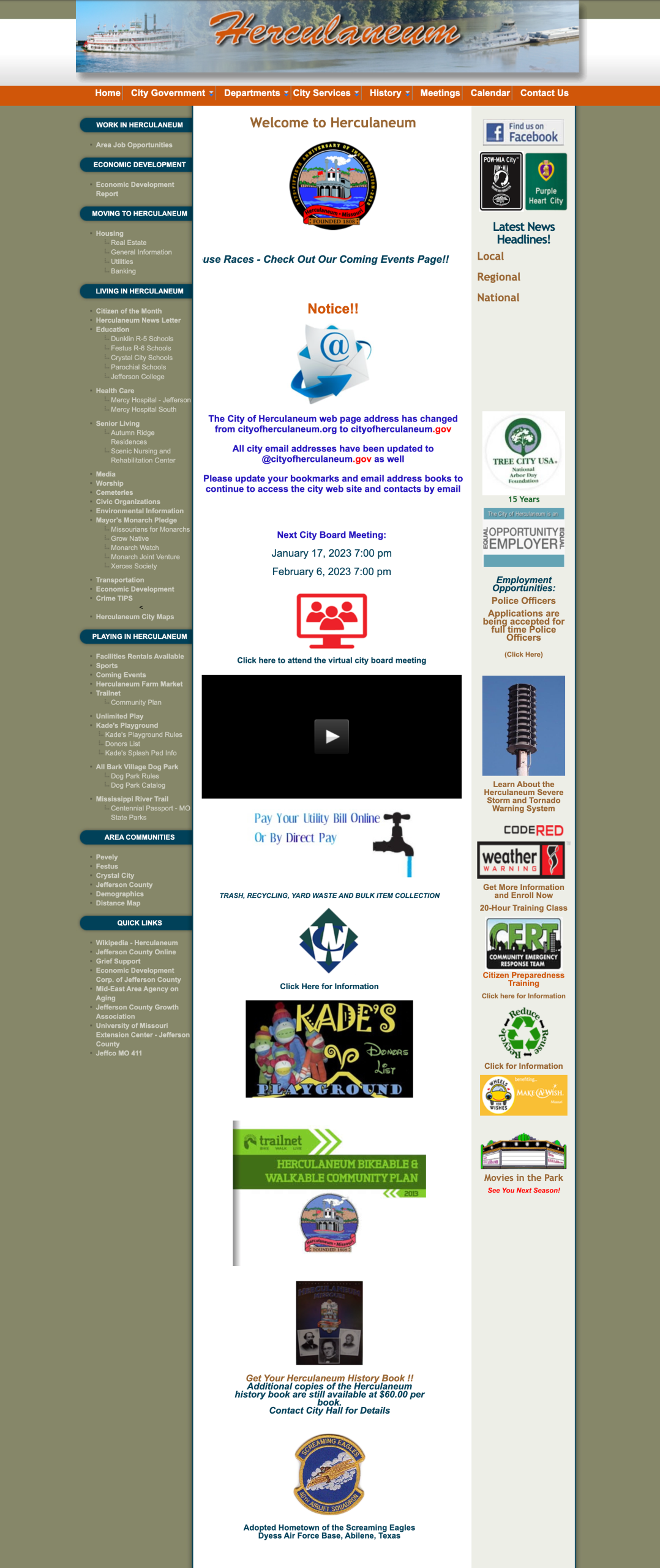
Legacy Landing page
The legacy landing page exemplified the challenges facing many small municipal websites—outdated design patterns, poor information hierarchy, and a cluttered user experience. The site used a dated tan and beige color scheme that felt more suited to the early 2000s than a modern government platform. Navigation was inconsistent and confusing, with no clear path to essential services residents needed most.
Functionally, the homepage suffered from critical usability issues. Contact forms were broken, preventing residents from reaching city departments online. The layout was text-heavy with poor visual hierarchy, making it difficult to scan and find specific information quickly. There was no mobile responsiveness whatsoever—residents attempting to access the site on phones encountered tiny text, horizontal scrolling, and unusable navigation.
The site also lacked any cohesive content strategy. Important information was buried beneath less relevant content, and there was no clear prioritization of high-traffic services like bill payment or permit applications. Emergency information and city announcements were not prominently displayed, reducing the site’s effectiveness as a communication tool during urgent situations.
- Visual design issues (dated color scheme, poor hierarchy)
- Functional problems (broken forms, no mobile support)
- Usability challenges (confusing navigation, text-heavy layout)
- Content strategy gaps (poor prioritization, buried information)
Updated Landing Page
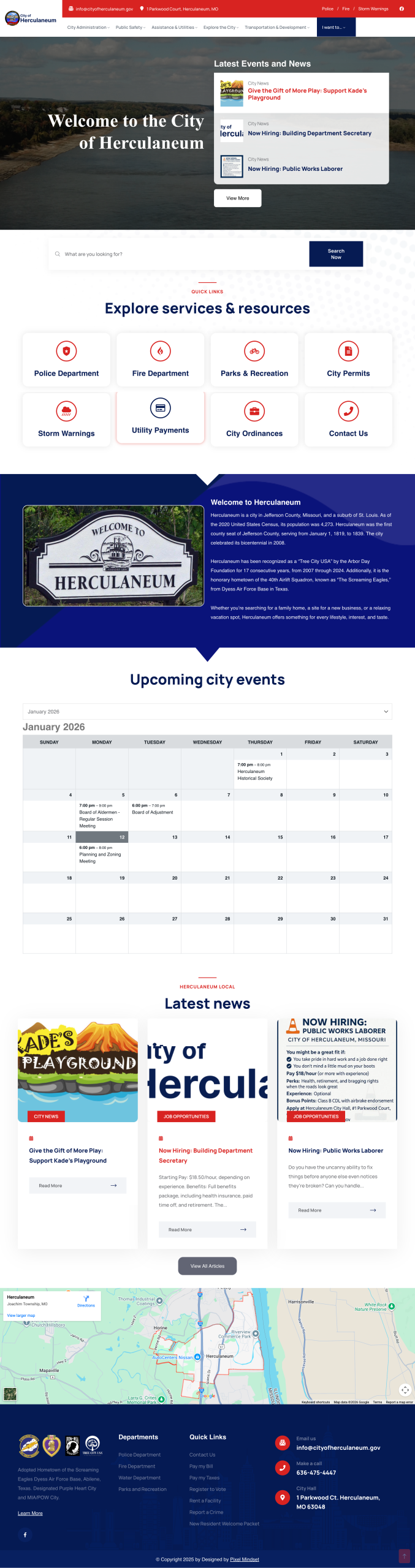
The homepage transformation focused on creating an intuitive, resident-first experience that prioritized the most-accessed services identified through analytics. The design opens with a welcoming header featuring the city’s riverside identity, immediately establishing a sense of place and community connection.
The layout organizes content into strategic zones based on user needs and frequency of access. The latest news section provides tiered headlines—local, regional, and national—keeping residents informed at multiple levels. High-traffic actions like online bill payment are given prominent placement with clear calls-to-action, reducing friction for common tasks.
City board meeting information sits prominently on the homepage with dates, times, and virtual attendance links, making civic participation more accessible. Emergency preparedness is prioritized with visible modules for the Code Red notification system and weather alerts, ensuring residents can quickly access critical safety information.
Throughout the design, I employed clear visual hierarchy and generous whitespace to combat the cramped, overwhelming feeling of the legacy site. Each content block serves a specific purpose, with intuitive navigation that allows residents to drill deeper into city services, departments, and resources as needed. The modular approach also gives city staff flexibility to update content and highlight timely information without requiring developer intervention.
Mobile responsiveness
Given that mobile traffic now represents the majority of municipal website visits, I prioritized mobile-first design principles. Navigation collapses into a hamburger menu, content sections stack vertically for easy scrolling, buttons and links are sized appropriately for touch targets, and critical actions like bill payment remain prominently accessible regardless of screen size.
Department integration
Consolidating police and fire department content into the main site required careful consideration of each department’s unique needs while maintaining visual and structural consistency. I created flexible page templates that allowed departments to maintain their identity through custom header images and departmental information while benefiting from the unified navigation and branding of the city site.
Permit Page
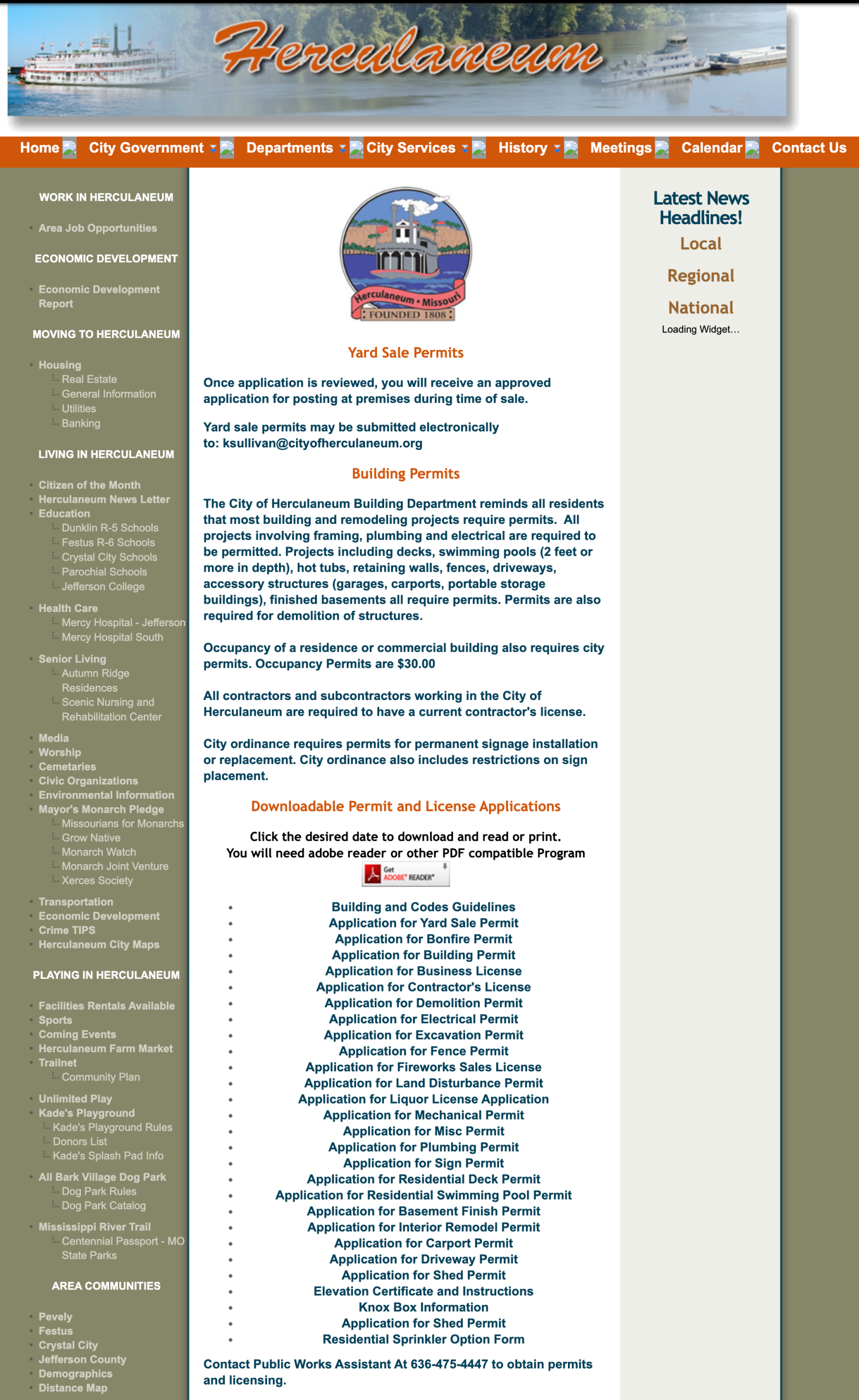
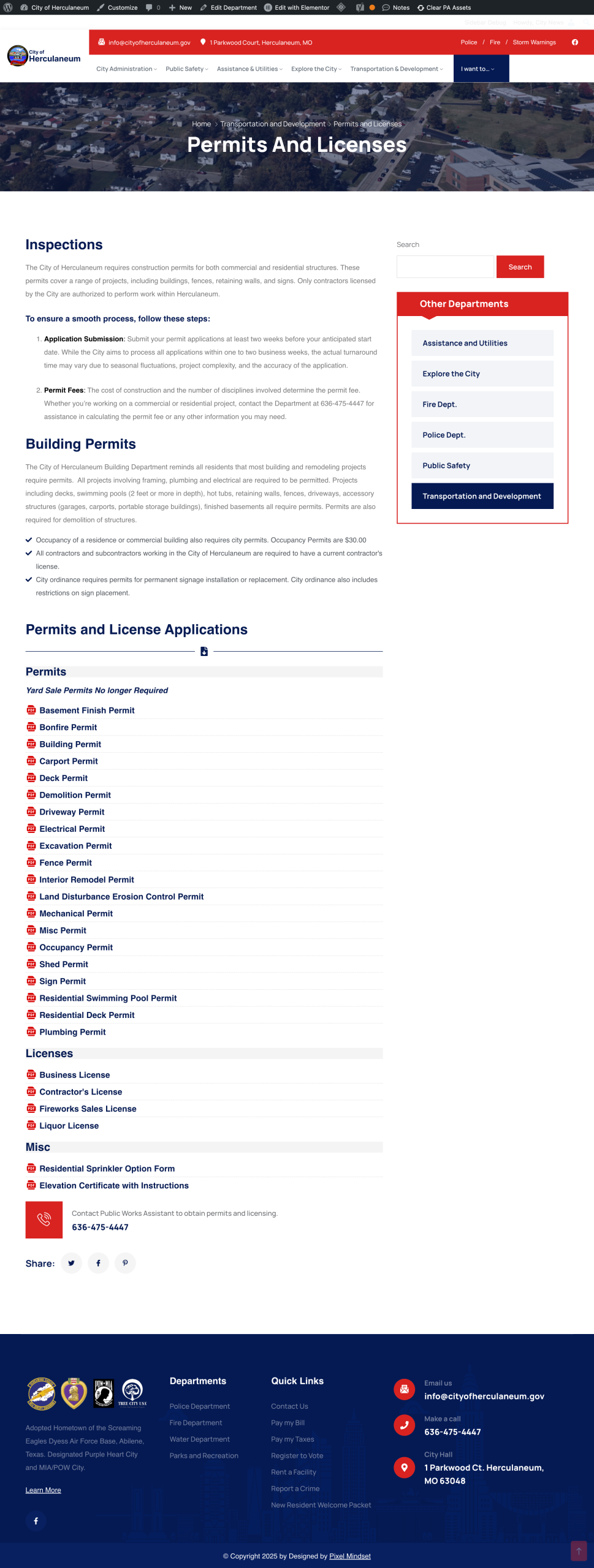
The legacy permit system was one of the most frustrating aspects of the old site for residents. Poor formatting made it difficult to scan and locate specific permits—all text was displayed in bold, eliminating any visual hierarchy or emphasis. Even worse, every permit was prefixed with “Application for…” which made alphabetical listings confusing. A resident looking for a building permit had to mentally skip past “Application for” on every single entry, adding unnecessary cognitive load to an already tedious task.
I restructured the permit section with a user-centered approach that prioritized scannability and clarity. The new design leads with the actual permit name first—”Building Permit” instead of “Application for Building Permit”—making alphabetical scanning intuitive and efficient. I organized permits by category (building, electrical, plumbing, etc.) with clear visual separation between sections. Proper typographic hierarchy was implemented using varied font weights and sizes, allowing residents to quickly distinguish permit titles from descriptions. Each permit listing now includes downloadable PDF applications where available, along with clear instructions for in-person submissions when necessary. The improved structure reduced confusion and phone calls to city hall from residents trying to figure out permit requirements.
Legacy Permit Page
Updated Permit Page
Contact Us Page
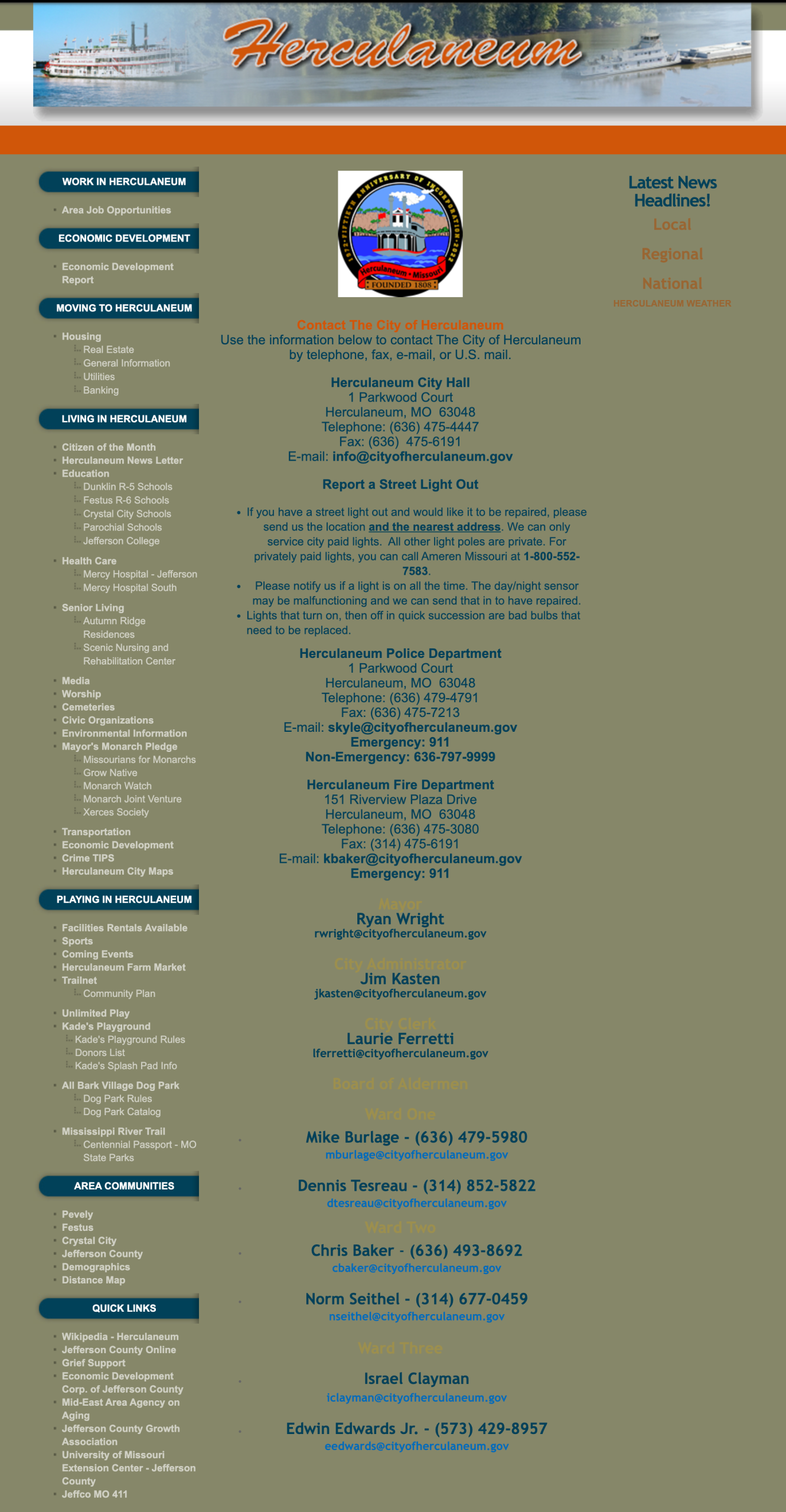
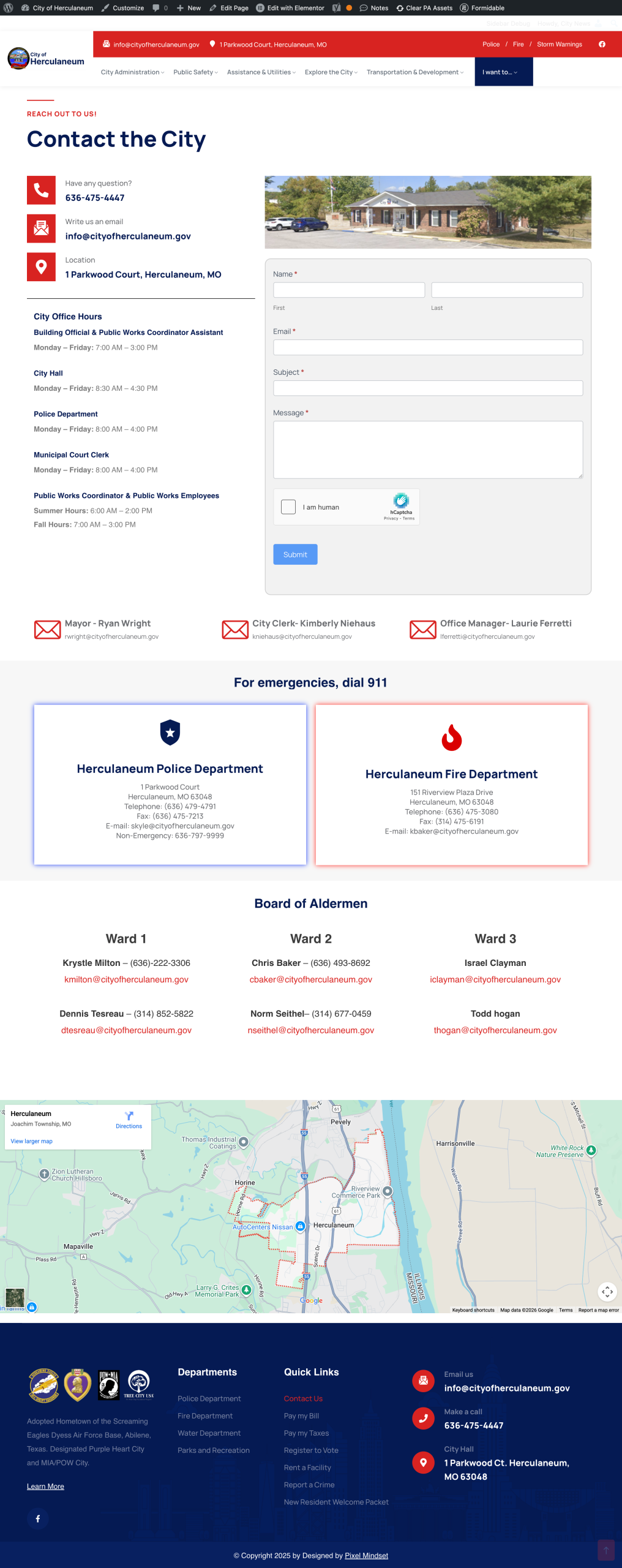
The old contact page was essentially a wall of text with phone numbers and email addresses buried in paragraphs. There was no visual organization to help residents identify which department handled their specific need. The broken contact forms meant the page failed its primary purpose—enabling residents to reach city staff digitally.
The redesigned contact page uses a card-based layout that clearly delineates each department with dedicated contact information. Each card includes the department name, phone number, email address, and physical location within city hall. I organized departments logically based on common resident needs, placing high-contact departments like billing and permits at the top. The new working contact form is prominently featured with clear field labels and helpful validation messages. I also added a visual map showing city hall’s location and an FAQ section addressing the most common inquiries, reducing the need for residents to reach out for basic questions.
Mobile responsiveness
Given that mobile traffic now represents the majority of municipal website visits, I prioritized mobile-first design principles. Navigation collapses into a hamburger menu, content sections stack vertically for easy scrolling, buttons and links are sized appropriately for touch targets, and critical actions like bill payment remain prominently accessible regardless of screen size.
Department integration
Consolidating police and fire department content into the main site required careful consideration of each department’s unique needs while maintaining visual and structural consistency. I created flexible page templates that allowed departments to maintain their identity through custom header images and departmental information while benefiting from the unified navigation and branding of the city site.
Legacy Contact Us Page
Updated Contact Us Page
Police Page Integration
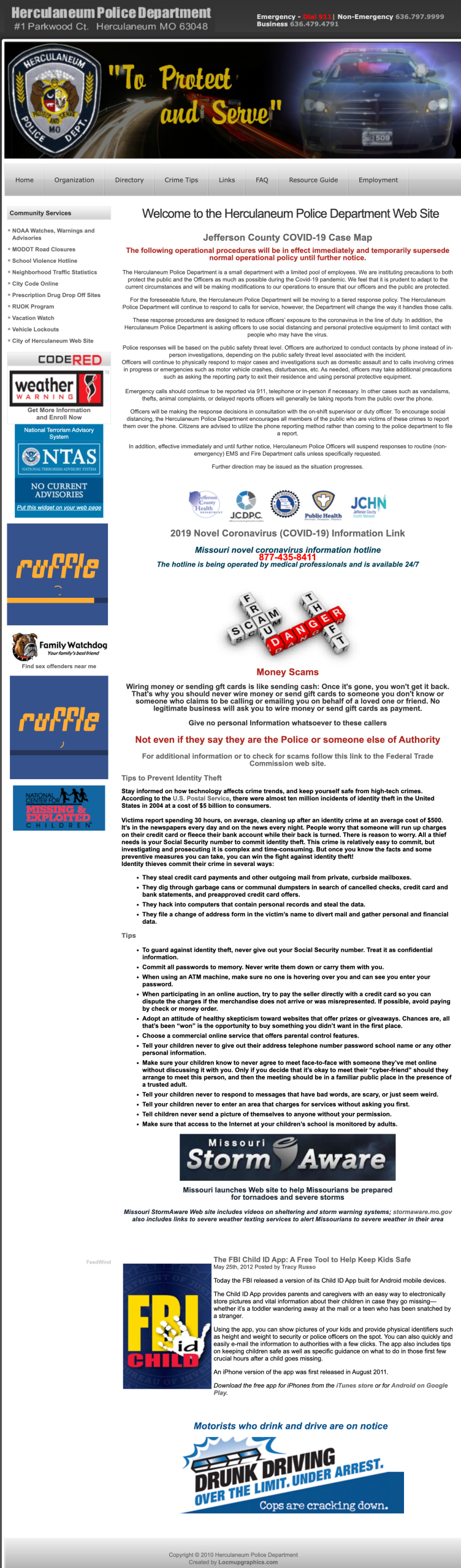
The legacy police department page exemplified a common problem with departmental microsites—information overload with poor prioritization. The page was essentially a dumping ground for every possible piece of information, warnings, and external links, creating an overwhelming wall of content that made it nearly impossible for residents to find what they actually needed. COVID-19 notices, scam warnings, weather alerts, FBI child safety information, and drunk driving campaigns all competed for attention with no clear hierarchy or organization.
Key pain points included:
- Content overload: The page contained excessive information, much of which was outdated or of questionable relevance to most residents visiting the police department page
- Navigation challenges: The police department existed as a separate subdomain, requiring residents to navigate away from the main city site, creating a disjointed experience
- No clear hierarchy: Important information like contact numbers and how to file reports was buried among dozens of other elements
- Difficult editorial decisions: Determining what content truly served residents versus what could be removed or relocated required careful analysis and stakeholder consultation
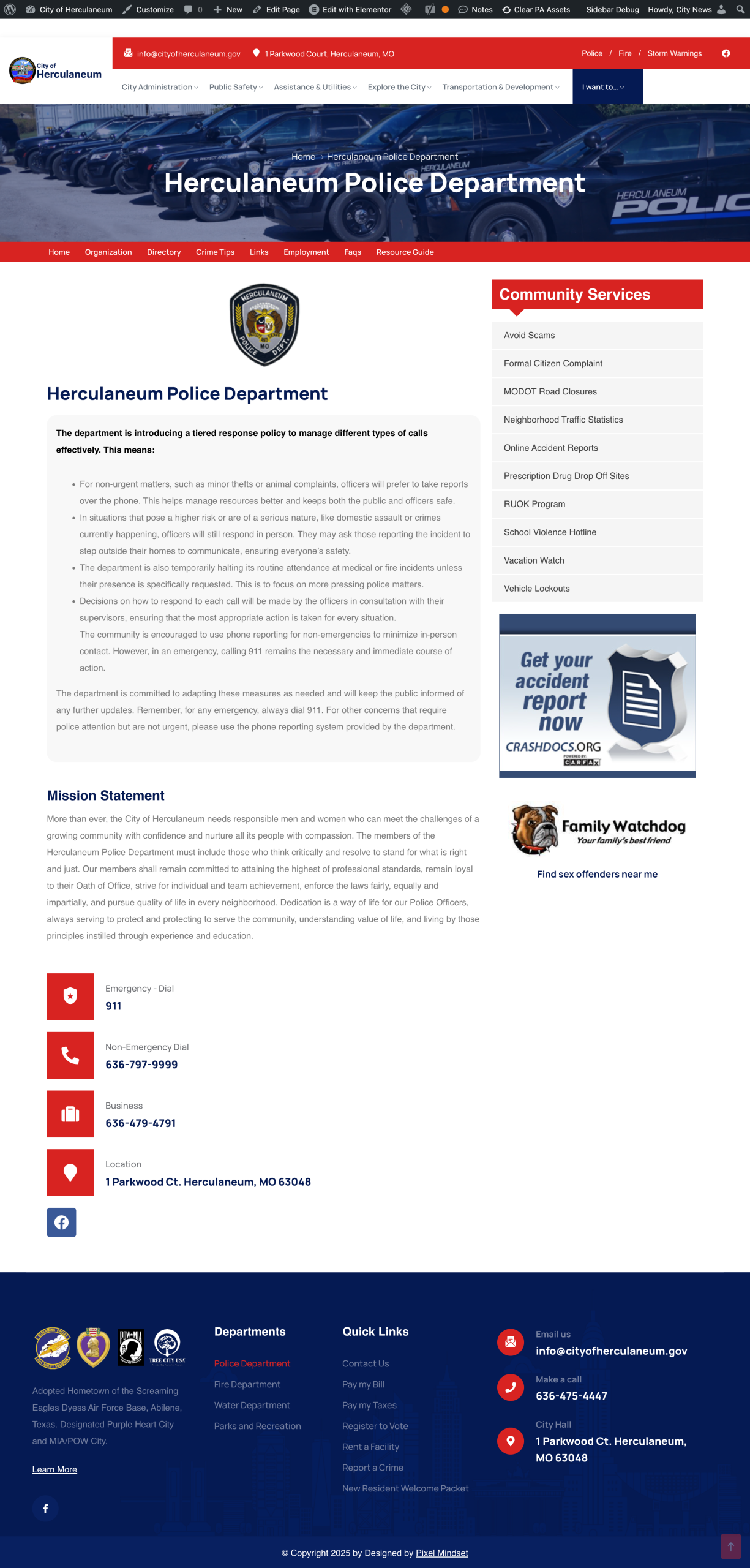
The redesign focused on radical simplification and integration. I consolidated the police department into the main city website structure, eliminating the separate subdomain and creating a cohesive experience. A dedicated secondary navigation bar was implemented specifically for police department pages, allowing easy movement between related sections like Organization, Directory, Crime Tips, Links, Employment, FAQs, and Resource Guide while maintaining context within the police department section.
Content was dramatically streamlined to focus on what residents actually need from a police department page: understanding the department’s mission, accessing community services, finding contact information, and knowing how to report incidents. The sidebar Community Services module provides quick links to high-value resources like filing formal complaints, accessing accident reports, checking vehicle lockouts, and finding sex offenders—all organized by task rather than buried in paragraphs of text.
The page now features clear, scannable sections with proper visual hierarchy. Emergency and non-emergency contact numbers are prominently displayed in large, easy-to-read call-out boxes with icons. The mission statement provides context about the department’s values and approach without overwhelming the visitor. Ancillary information that didn’t serve immediate resident needs was either removed entirely or relocated to appropriate subpages within the dedicated police section.
Legacy Police Department Landing Page
Updated Police Department Landing Page
Technical Implementation
WordPress development
I built the site on WordPress for its ease of use, allowing city staff with varying technical abilities to update content without developer intervention. Custom post types were created for different content categories like news, events, and board meetings, each with appropriate fields and templates. The design system uses a clean, professional color palette that reflects municipal authority while being more modern and approachable than the legacy tan and beige scheme.
Domain migration & redirects
Migrating from cityofherculaneum.org to cityofherculaneum.gov while consolidating the police and fire department sites required meticulous planning. I created a comprehensive redirect map covering hundreds of URLs across all three legacy sites. Each redirect was tested to ensure proper 301 status codes and that users landed on the appropriate corresponding page on the new site. Special attention was paid to commonly bookmarked pages and high-traffic URLs identified in analytics. The .gov domain transition also required coordination with the appropriate government registrar and verification processes to prove the city’s authority to use the domain.
Performance optimization
Municipal websites often suffer from slow load times due to large images and unoptimized code. I implemented performance best practices including image compression and optimization, efficient CSS and JavaScript delivery, browser caching strategies, and mobile-optimized responsive images. These optimizations ensure the site loads quickly even for residents with slower internet connections.
Accessibility compliance
As a government website, accessibility compliance is not just good practice but often legally required. I ensured the site met WCAG 2.1 AA standards through semantic HTML structure, sufficient color contrast ratios, keyboard navigation support, alt text for all images, and proper heading hierarchy for screen readers.
Results & Impact
Immediate improvements
The launch was met with positive feedback from both city staff and residents. Contact forms now work reliably, allowing citizens to reach city departments without phone calls. Mobile users can access the full range of city services from their phones, which was previously impossible. Navigation has been streamlined, with analytics showing reduced bounce rates and increased page depth as users can actually find what they’re looking for. City staff are now managing a single website instead of three, significantly reducing their workload and ensuring consistent information across all departments.
Ongoing success
The site has become the central hub for community engagement in Herculaneum. It’s actively used for announcing local events, posting city news and updates, processing online bill payments, managing permit applications, distributing emergency alerts and weather warnings, and publishing meeting agendas and minutes. The city reports increased online engagement and reduced call volume to city offices for basic information requests.
Budget efficiency
By delivering a comprehensive solution within the city’s limited municipal budget, I demonstrated that effective digital government services don’t require expensive enterprise solutions. The WordPress platform provides long-term cost efficiency through low hosting costs, free security updates, and the ability for city staff to make routine updates without developer fees.
Moving forward
Future iterations
There are several opportunities to enhance the site further as budget allows. Implementing a more robust events calendar with resident submission capabilities would increase community engagement. Adding online forms for more permit types could further reduce in-person visits to city hall. A resident portal where citizens can manage multiple city services from a single dashboard would streamline the user experience.
Learnings
This project reinforced the importance of stakeholder management in government projects, where decisions often require committee approval and consensus building. The experience taught me valuable lessons about working within budget constraints while still delivering quality outcomes, the critical importance of thorough redirect mapping when consolidating multiple sites, and how analytics should drive design decisions rather than aesthetic preferences alone. Most importantly, I learned that municipal websites serve a vital civic function—they’re not just marketing sites but essential infrastructure that residents depend on for accessing government services, staying informed, and participating in their community. This responsibility shaped every decision throughout the project, ensuring the final product truly served the needs of Herculaneum residents.